
Embeddable widget
Drop a chat bubble on any website, connected to one Pepe agent.
Embeddable widget
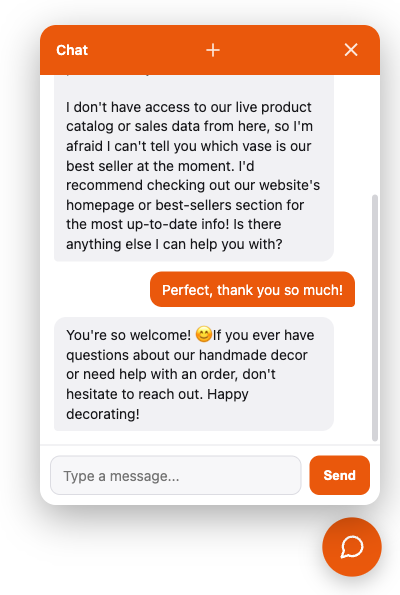
The widget is a chat bubble you drop into any web page with one <script> tag.
It renders a floating button, opens into a chat panel, and talks to a Pepe agent
over a live, streaming connection, no dependency and no build step on the page
that embeds it.
Mint a widget token
A widget’s script tag sits in public page source, so it needs its own kind of token: always locked to one agent, and bound to the site’s origin.
pepe token add --agent support --widget --allowed-origin https://example.com --label "example.com widget"--widget requires --agent: a public credential always pins to one known-safe
agent, never a whole project. --allowed-origin is the site’s
scheme and host; the widget’s connection is refused from anywhere else. See
Authentication and tokens for the general token model this builds on.
Or do it from the dashboard
The Channels section has a + Widget button that opens a form right there
(label, agent, allowed origin, and appearance), no separate trip to the tokens
page. After creating one, the dashboard shows the full <script> tag already
filled in with the real token, agent, and your server’s own address, ready to
copy and paste. Existing widgets keep a collapsible snippet too, and their raw
token stays visible any time; unlike a regular API token, a widget token’s
value isn’t a secret worth hiding (see Security below), so
there’s no “copy it now, you won’t see it again.” Changing which agent or
origin a widget uses still means minting a new one and revoking the old
(those stay rotate-only), but appearance can be edited in place at any time.
Set the look from the dashboard
Title, logo, color, theme, greeting and position don’t have to live in the
<script> tag at all; set them on the widget token instead (at creation, or
later via the Edit appearance button on an existing widget) and the
script fetches them at load time. Precedence is per field, not all-or-nothing:
the token’s value wins whenever it’s set; a field left unset on the token
falls back to the tag’s own data-* attribute, then to the built-in default.
So this is entirely optional (a plain data-token embed with nothing else
keeps working exactly as before), and the two can mix freely: color from the
dashboard, greeting hardcoded in the tag, say. The point is that a color or
greeting tweak never needs a site redeploy: change it on the dashboard,
reload the page, done.
Embed it
Paste the script tag on the page, pointed at your Pepe server:
<script src="https://your-pepe-host/plugin-assets/pepe-widget/widget.js"
        data-agent="support"
        data-token="pepe_your_widget_token"
        data-title="Chat"
        data-logo="https://example.com/logo.png"
        data-color="#ea580c"
        data-theme="dark"
        data-greeting="Hi! How can I help?"
        data-position="right"
data-lang="en"></script>| Attribute | What it does | Default |
|---|---|---|
data-agent |
Cosmetic only: names the visitor’s local session so more than one widget can share a page without colliding. A widget token is always locked to one agent, so this never changes who actually answers. | default |
data-token |
The widget token from token add --widget. |
none |
data-server |
The host to connect to. | the script’s own host |
data-title |
The panel header’s text. | “Chat” |
data-logo |
A small square image, used for the bubble icon and next to the header title. Omit it to keep the plain chat icon. | none |
data-color |
Accent color for the bubble, header and buttons. | #ea580c |
data-theme |
light or dark; the panel’s base colors below the header. |
light |
data-greeting |
The first message shown before the visitor sends anything. | picked from data-lang, English otherwise |
data-position |
left or right. |
right |
data-lang |
The site’s own language (e.g. pt-BR), not the visitor’s browser locale. A site knows what language it’s written in, whereas a browser locale is only a guess about whoever’s reading it. Picks the built-in greeting when data-greeting isn’t set, and is sent once at join so the agent leans toward that language from its very first reply. |
none |
No build step, no npm install: widget.js and its stylesheet are served
directly by your Pepe server at /plugin-assets/pepe-widget/, the same generic
route any future plugin’s static assets would use.
How a visitor’s session works
Each visitor gets a random id, stored in their browser’s localStorage, sent as
the connection’s session so a reload continues the same conversation. Under the
hood the widget speaks the same protocol described in WebSocket:
prompt in, delta / done / error / watch / session_ended out. A
bouncing-dots indicator shows in the panel while the agent is working on a
reply, so a visitor never wonders if their message went through.
The header’s new-conversation button (a plain “+”) starts a new conversation
right away: it closes the current connection, clears the panel, and reconnects
under a fresh session id. That id is persisted immediately, so even a full page
reload keeps talking to the new conversation, not the old one. If the agent
itself ends the conversation (its end_session tool), the panel shows a small
system note in its place and the next message you send starts fresh, without
needing to click anything.
/model, /models, or any other slash command, only the
reset button. A widget is always pinned to one agent's own model; to offer a
visitor a different one, mint a separate widget token against an agent already
set up with that model.In the dashboard’s Chat page, widget conversations group under Widget, one
subgroup per site (the token’s allowed_origin), so running more than one
widget across different sites keeps their conversations easy to tell apart,
distinct from the dashboard’s own built-in chat.
Security
- Origin-bound. A browser connecting with a given widget token is refused
unless its
Originmatches that exact token’s ownallowed_origin(or your own server’s own host). A copy of the script pasted onto an unregistered site is refused before it can reach the agent, and a leaked token can’t be replayed from a different site either, even one this same server also happens to serve a widget for. - Agent-locked. A widget token always runs exactly the one agent it was minted for; the widget has no way to ask for a different one.
- Rate-limited. Prompts through a widget connection are capped (20 per
minute by default, overridable with
config :pepe, widget_rate_limit:/widget_rate_window_s:if you self-host and need to tune it) so a public, in-page-source token can’t be hammered. No other surface is affected. - Not treated as a secret. A widget token’s raw value sits in public HTML
already, readable with “view source” on the embedding site; so, unlike a
regular API token, it’s stored recoverable and stays visible in the
dashboard/
manage_token list. What actually protects it is the three points above, not hiding the string.
Do it by chat
An agent with the manage_token tool can mint a widget token in conversation:
Create a widget token for the support agent, allowed from https://example.com.
The agent calls manage_token with action: "create", agent: "support",
widget: true, and allowed_origin: "https://example.com". Minting a token is
not read-only, so the call goes through the permission gate; the raw token
comes back in the reply for you to copy into the script tag, and stays
available any time with action: "list", since a widget token isn’t a secret
worth hiding.
Appearance works the same way, on either action: pass any of title, logo,
color, theme, greeting, position on create, or later with
action: "update" and the token’s id:
Change the support widget’s greeting to “Hey! Need a hand?” and set its color to #2563eb.
The agent calls manage_token with action: "update", id: "<the token's id>",
greeting: "Hey! Need a hand?", and color: "#2563eb"; a field left out of
the call keeps its current value.